
Building an AI tutor is one thing. Getting a school district to trust it with student data is another.
EdTech teams are moving quickly to bring AI into tutoring, courseware, and assessment. But even a great AI feature can get stuck in a security review when someone asks a question the team hasn't prepared for.
Who can access student data? What happens if the AI gives a student an inappropriate answer? How would we know something went wrong?
These aren't questions you want to be figuring out two weeks before launch. The good news? AI governance doesn't have to slow development down. When you build the right controls into your system from the start, you can catch problems earlier, move through security reviews more confidently, and give schools greater confidence in your product.
Here's what AI governance means for EdTech, the six controls to prioritize, and how to put them into practice.
What is AI governance in education?
AI governance in education is how you make sure AI systems use student data responsibly, produce appropriate outputs, and remain accountable to the people using them.
It covers everything from data privacy and security to output validation, monitoring, and human oversight.
For engineering teams, that means answering a few practical questions:
- What student information does the AI actually need?
- What can the model access, generate, or change?
- How do we catch incorrect or inappropriate responses?
- When should a teacher or administrator step in?
- Can we trace what happened if something goes wrong?
The answers shouldn't live exclusively in a policy document. They should show up in how the software works.
And not every AI feature needs the same level of oversight. A teacher-facing tool that drafts practice questions is different from a chatbot interacting directly with a 12-year-old. An assessment system that influences grades raises the stakes even more.
The more consequential the output, the stronger the safeguards need to be.
How do you build AI governance into an EdTech product?
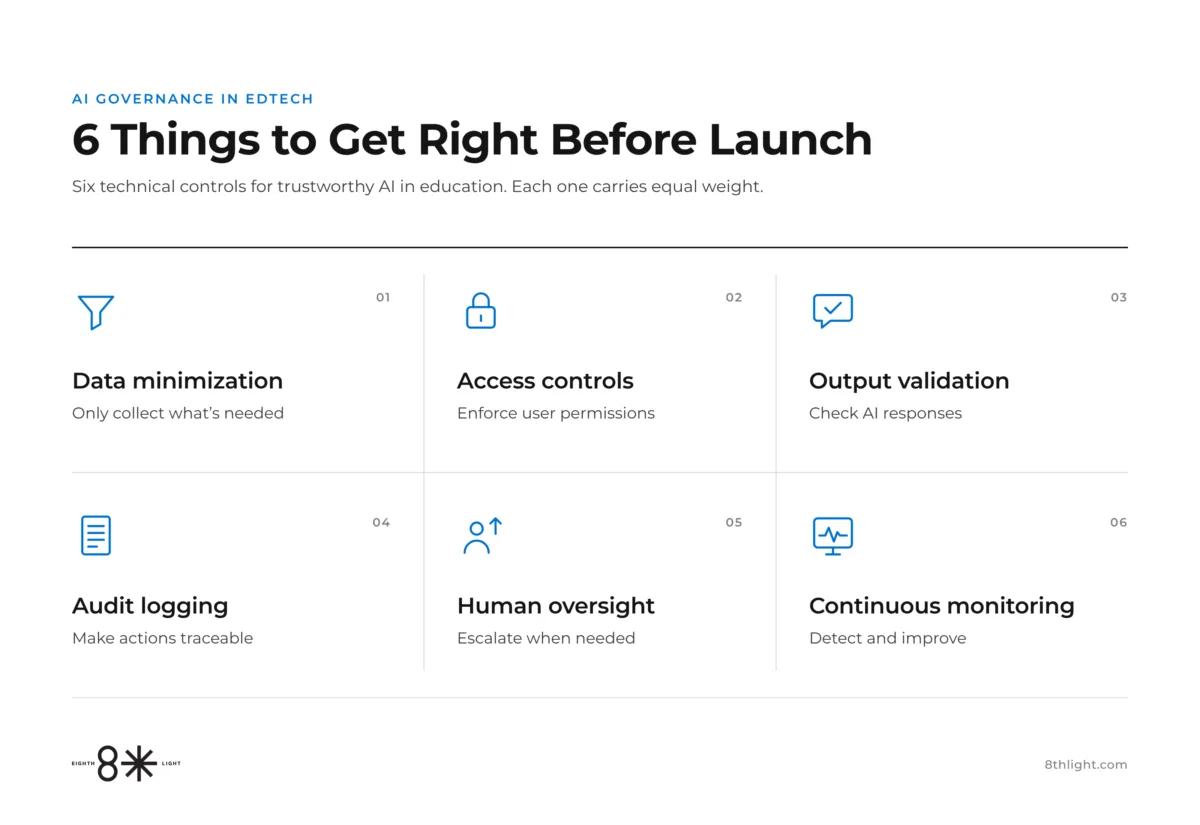
Start with six controls that address the most common risks around student data, AI-generated content, and accountability. You don't necessarily need six new systems. In many cases, you can extend the security, testing, and monitoring practices your team already uses.
#1: Give the AI only the data it needs.
Limit the student information your AI feature can access. An AI tutor helping with a math problem probably needs the student's grade level, current question, and relevant learning context. It probably doesn't need their home address or full academic record.
Start by putting some boundaries around what data enters your system:
- Identify the minimum data required for each interaction.
- Filter unnecessary personal information before sending requests to a model.
- Define retention and deletion rules for conversations.
- Review what your model providers store and whether they can reuse that data.
The less sensitive information your system handles, the less you have to protect.
#2: Make permissions part of the architecture.
Control what the AI can access based on who's using it.
A student should only access their own work. A teacher may need access to an entire class. Your AI shouldn't become a shortcut around those boundaries.
To keep those boundaries intact, build access controls into the system itself:
- Enforce role-based access at the application and data-retrieval layers.
- Check permissions before information reaches the model.
- Test whether prompts can trick the system into retrieving another student's information.
- Require explicit authorization for sensitive actions.
Here's a useful test: If a student asks the tutor to show another student's grades, what actually stops it? The answer should be an enforced permission check, not an instruction asking the model to behave.
#3: Check AI responses before students see them.
Validate model outputs for safety, accuracy, and appropriateness.
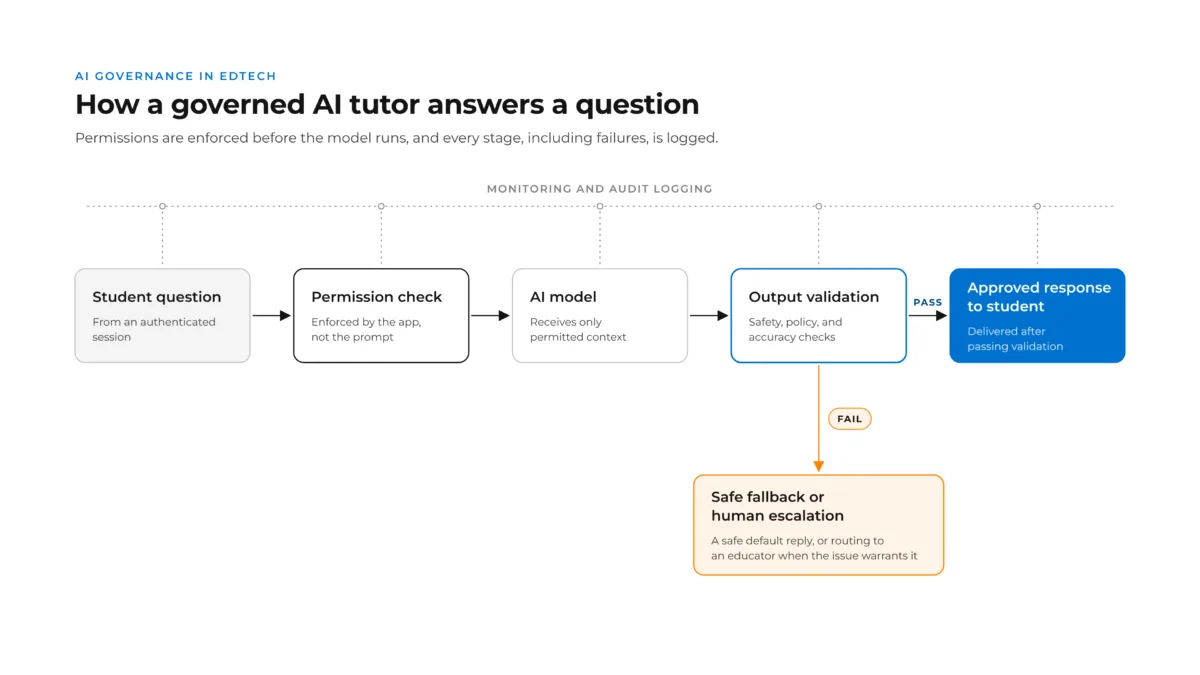
AI can produce incorrect information, respond to inappropriate requests, or generate content that doesn't match a student's age or learning context.
You can't prevent every bad response, but you can catch more before it reaches students.
A few safeguards can help catch problems before they reach students:
- Apply age-appropriate content and policy checks.
- Ground answers in approved educational materials.
- Test common failure scenarios, including attempts to bypass instructions.
- Define what happens when a response fails validation: retry, provide a safe fallback, or escalate.
And keep testing after launch. Model, prompt, and content changes can introduce new problems.
#4: Keep a record of what happened.
Make every AI interaction traceable so your team can investigate problems.
Imagine a parent reports that an AI tutor gave their child inappropriate or misguided advice. Your team needs to understand what happened without digging through disconnected systems.
Make it easier to investigate issues by capturing the right information:
- Record relevant requests, responses, retrieval events, and validation results.
- Track timestamps, session identifiers, and model versions.
- Make records searchable for authorized administrators.
- Protect logs with access restrictions, redaction, and retention limits.
The goal isn't to collect more student data. It's to retain enough appropriate evidence to understand what happened and why.
#5: Know when a human needs to step in.
Decide which situations require an educator, advisor, or administrator.
AI can certainly handle the routine questions and guide learning activities. The key question is where a human needs to step in without being prompted. Grades, placement recommendations, and student wellbeing concerns may need human review.
Build human oversight into the experience from the beginning:
- Identify high-risk decisions before development begins.
- Define escalation triggers and fallback behavior.
- Give educators context to review flagged interactions.
- Make it easy for students to reach a person.
Human oversight works best when it's built into the experience, not added as an emergency workaround.
#6: Monitor what happens after launch.
Treat governance as an ongoing engineering responsibility.
A feature that performs well in testing can behave differently when thousands of students start using it. New questions, unexpected usage patterns, and model updates introduce risks.
Once your feature is live, keep an eye on how it's actually performing:
- Track flagged responses, failed evaluations, and escalations.
- Monitor changes in response quality and behavior.
- Set alerts for unusual activity or repeated failures.
- Feed real-world findings back into automated testing.
Monitoring should help your team improve the product, not just produce another dashboard.
What laws apply to AI in education?
In the US, three areas are especially important for EdTech teams: FERPA, COPPA, and state student privacy laws. The exact requirements depend on your product, the students it serves, and how schools use it.
Here's a breakdown of each regulation and what it means for your product.
- FERPA (Family Educational Rights and Privacy Act): Products handling education records for covered schools need appropriate limits on data access, use, and disclosure. School control and vendor agreements matter.
- COPPA (Children's Online Privacy Protection Act): Products directed to children under 13, or that knowingly collect their personal information, may face additional consent, collection, security, retention, and disclosure requirements.
- State student privacy laws: Laws such as California's SOPIPA, Illinois's SOPPA, and New York's Education Law 2-d add requirements around student data use, security, and vendor practices.
Here's the distinction worth remembering: Compliance requirements tell you what you need to protect. Engineering controls determine how you protect it.
District contracts may add requirements around model providers, breach notifications, and data deletion. For instance, they may require proof that student data is protected from unauthorized access. Your team needs to be prepared to show how access is enforced, tested, and monitored. That's why governance needs to be something you can demonstrate, not just document.
This is general engineering guidance, not legal advice. Work with your legal and privacy teams to determine your product's requirements.
What does AI governance look like in a real EdTech product?
One prime example is our work with AllCampus, an education and enrollment services provider.
AllCampus wanted to help prospective learners navigate educational opportunities without forcing everyone through the same intake process. Some were exploring career options. Others knew what they wanted to study. Still others needed help understanding employer education benefits.
Working with AllCampus, 8th Light developed Ally, an AI advisor integrated into its existing Workforce Education platform. The challenge wasn't simply building a chatbot that could answer questions. It was creating an experience that could adapt to different learner needs while remaining observable, testable, and connected to human advisors.
That meant making several important engineering decisions:
- Integration with existing systems: Ally uses program information from the platform's backend rather than operating as a disconnected chatbot.
- Automated evaluations: Scripted conversations test how the assistant responds as the system changes, helping identify regressions.
- Conversation observability: Interactions are captured and tagged for authorized review, giving administrators visibility into performance.
- Built-in safeguards: Content moderation, consent handling, and governance controls are incorporated into the experience.
- Human involvement: Advisors remain part of the process, handling conversations that need more personal attention.
AllCampus serves adult learners, so its regulatory requirements differ from those of a K–12 tutoring platform. But the engineering lesson carries over:
Building a useful AI experience also means building the systems to evaluate, monitor, and improve it. That's what makes governance practical. It becomes part of how the product works and evolves, rather than a separate pre-launch exercise.
See how we built Ally for AllCampus.
Is your AI feature ready to launch?
Before putting an AI feature in front of students, your team should be able to answer six questions.
AI governance launch checklist
- Data: Can we show exactly what student information the AI accesses and why?
- Permissions: Have we tested if users can access information outside their authorized scope?
- Outputs: Do we have automated checks for unsafe or unreliable responses?
- Auditability: Can we investigate an interaction without unnecessarily exposing student data?
- Human oversight: Have we defined when and how a person takes over?
- Monitoring: Will we know when the system's behavior changes or something goes wrong?
If you can't confidently answer one of these, you've identified something worth addressing before launch. If you can answer all six, you're better prepared to show how your product handles risk when a district asks.
Build governance in now, not after launch
The hardest part of AI governance isn't writing the rules. It's turning them into software that works reliably, can be tested, and holds up as your product grows.
That takes more than choosing the right model. It takes thoughtful architecture, security controls, automated evaluations, and monitoring that continues long after launch.
At 8th Light, we help EdTech teams design and build AI products with those capabilities in place from the start.
Building AI into your EdTech platform? Let's talk about what it takes to get it into production.
This is the first article in our series on building AI for education. Next, we'll look at how governance differs across tutoring, courseware, and assessment.
Frequently asked questions
Can AI tutoring platforms be FERPA-compliant?
Yes. FERPA doesn't prohibit AI tutoring. A platform can support FERPA compliance when the school has an appropriate legal basis for sharing education records and the vendor meets applicable requirements around data use, access, and disclosure. Model providers must also be accounted for.
What's the difference between AI governance and AI security?
AI security protects systems and data from threats such as unauthorized access, prompt injection, and information leaks. AI governance is broader, covering appropriate use, output quality, accountability, monitoring, and human oversight. Security is one part of governance.
Can AI governance be automated?
Many activities can be automated, including access enforcement, content moderation, regression testing, logging, and monitoring. Human oversight remains important for consequential decisions and situations requiring professional judgment.